A process routing is a sequence of processes that completes manufacturing of a component (part or assembly); for example, Cut-to-Length > Laser Cut > Bend Brake.
- As alternative and optional processes may be used to manufacture a component, multiple routing options exist for the same component.
- aPriori evaluates feasibility and cost of available routing options and auto-selects the best routing for the component.
- You can use the aPriori Routing Selection window to select an alternative routing manually and/or change routing options.
For details about the process setup options available for a specific process group, refer to the Routings section within the process group chapters.
Display the Routing Selection window
In the Manufacturing Process pane, click Edit > Routing Selection or right-click and select Routing Selection.
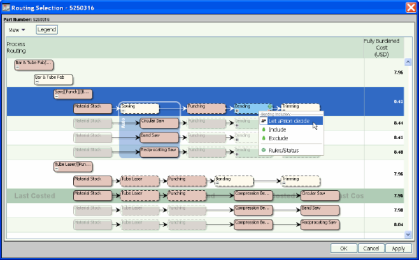
The Routing Selection window displays:
-
Alternative routings for the selected process.
-
Optional processes for every routing.
-
The Process Routing column of the routing table shows all routing choices for the process. Every row in the routing table represents a routing choice.
-
The Cost column shows the cost of every routing. The last costed routing is highlighted and marked Last Costed.
